Run a council in Sidecar
Ask Losi to run a council, and three or more Sidecar Helpers answer the same question, challenge each other’s claims, check the facts, and agree on one answer.
Sidecar usually splits a job. One Helper researches, another drafts, a third reviews, and Losi merges what they bring back. That works when the parts are separable.
It works less well when the question itself is contested: a pricing call, a diagnosis, whether a claim in a document holds up. Each Helper only sees its own slice, and nobody checks anyone else.
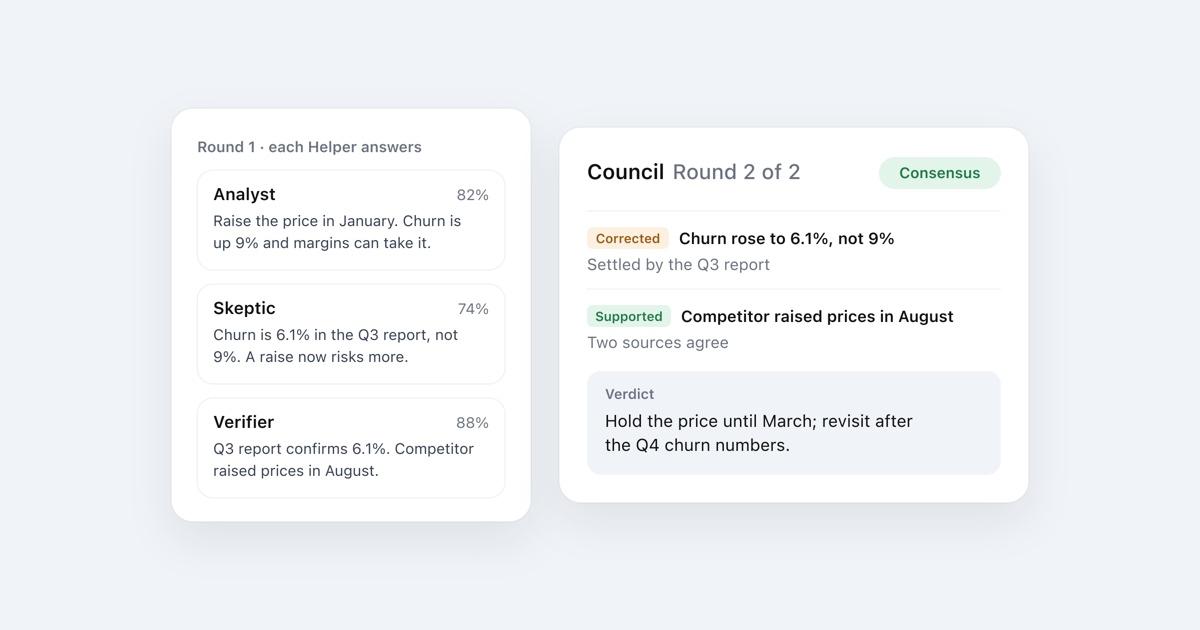
Council mode changes that. Ask Losi to run a council, and Sidecar seats three or more Helpers on the same question. Each one answers it, reads the others' answers, argues over the claims that differ, and checks the disputed facts. They finish with one verdict.
Start a council
Say it in any chat:
- "Run a council on whether we should move the launch to March."
- "Have the agents debate this and come to a conclusion."
- "Get three experts to argue it out: is this contract clause enforceable?"
It works the same on the web, iPhone, iPad and Android. Losi can also call a council itself when a question is contested or high-stakes.
What happens
- Seats. Losi picks lenses likely to catch each other's mistakes on this question, such as an Analyst, a Skeptic and a Verifier. One seat always checks facts against sources. Every seat answers the whole question with the tools a Helper has (web search, reading pages, your Spaces), then commits to a position with sources and a confidence score.
- Debate. Each seat reads the others' answers, labeled Seat A, B and C instead of by role so nobody defers to a title. It names the claims it disagrees with and checks them with its tools before arguing. Each claim gets marked supported, refuted or unverified. The seat concedes what it got wrong and revises its answer.
- Moderation. After every round, a moderator lists what the seats now agree on and which disputes would still change the answer. The next round goes straight at those disputes. When the seats agree, the debate stops, even if that happens right after their first answers.
- Verdict. Losi writes the answer. The conclusion comes first, then the reasoning built on the claims that survived checking. It says where the seats disagreed and what settled it, states anything still open with both sides, and ends with how confident the council is.
Follow along
Open the Sidecar panel while a council runs. The header reads Sidecar · Council, and a strip under it shows:
- the round, for example "Round 2 of 3"
- each seat and its current confidence
- the disputes being verified right now
- a Consensus badge once the seats agree
Each seat also has its own card with the searches it ran and the pages it read, so you can see where a claim came from.
When to use it
Councils are worth it for:
- decisions with real trade-offs, like pricing, hiring or a launch date
- questions where sources disagree
- checking a plan, a claim or a draft before you act on it
- a second opinion on a technical diagnosis
Skip it for quick facts, small edits, and work that splits cleanly into parts. Regular Sidecar is faster there. A council takes longer because every seat researches more than once.
Limits
- A council has 3 seats and up to 2 debate rounds. On Ultra it can seat up to 5 and run 3 rounds.
- Seats can only verify what their tools can reach. A claim nobody could check stays marked unverified, and the verdict says so.
- Consensus means the seats agree, not that they are right. The verdict shows its evidence so you can judge it yourself.
- On iPhone and Android, seats appear as Helper cards. The live council strip is on the web for now.
Council mode builds on research into multi-agent debate, which found that models arguing over several rounds make fewer factual mistakes, and on the anonymized peer review in LLM Council.
More from Losi
View all guides
Context·7 min
Use Context Bank Across Tools
Store memories, skills, soul, and Space knowledge in Context Bank, then reuse that context in chat, Spaces, and connected tools.

Import·8 min
Import AI Conversations and Memories
Bring over conversations, memories, ideas, drafts, and plans from other assistants, then turn the useful pieces into work.