AI chat with memory you can see and edit
Most AI chats start from zero every time. In Losi, you can save short facts and preferences as memories, and Losi can use them in later conversations.
Say "remember this" in chat, or add a memory in Settings. The list is yours to open, correct, and clear.
What Losi remembers
Losi remembers what is saved as a memory: stable facts, preferences, and project details. It is not a recording of every message you have ever sent.
You decide the scope. Some memories are about you, some belong to a workspace, and some belong to one Space, so a work project does not leak into a personal chat.
How you see and edit it
Open Settings > Profile and look under Privacy > Memories to read your personal memories. You can edit or delete any of them, or turn Memories off.
Workspace memories are in Settings > Workspace, where owners and admins manage them. Space memories are in that Space's settings.
Bring memories from another assistant
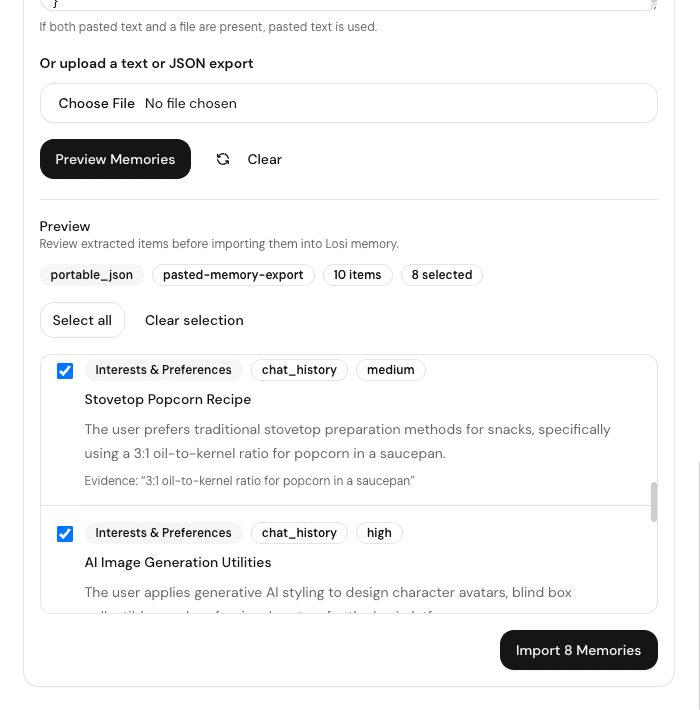
If ChatGPT, Claude, or Gemini already knows you, the importer can pull that in. You preview every item first and keep only what belongs, so nothing is saved blindly.
You can also import past chats. The import page lists what each assistant exports.
Memory versus starting over
The difference shows up the second time you ask for something.
- Without memory, you re-explain your role, tone, and project in every new chat.
- With memory, you say it once, check it in Settings, and ask Losi to work from it.
- When something is wrong, you fix the memory itself rather than arguing with the chat.
Questions
Is Losi an AI that remembers everything?
No. Losi uses the memories that are saved, which you can read in Settings. Anything you want it to keep, say "remember this" or add it yourself. Review sensitive details before you save them.
Can I see and edit what Losi remembers?
Yes. Personal memories are in Settings > Profile under Privacy > Memories, where you can edit or delete them. Workspace memories are in Settings > Workspace, and Space memories are in each Space's settings.
Can I bring my memory from ChatGPT, Claude, or Gemini?
Yes. Paste a memory summary or upload a chat export in the importer. You preview each item before saving, and you can edit or remove imported memories later.
Can a project keep its own memory?
Yes. Add Space memories in a Space's settings, and turn on "Use only this Space's memories in Space chats" to keep that project separate.
Can other AI tools use my memories?
Tools you connect over MCP or a workspace API key can search them. The Context Bank guide covers the setup step by step.
Is there a free plan?
Yes. The pricing page lists what each plan includes.
Is Losi an AI chatbot with memory?
Yes. Losi is an AI chatbot with memory you can read, edit, and delete. Saved memories stay until you change or remove them, so it works as an AI chat with long memory across conversations.
Can Losi be my AI second brain?
It holds the parts of a second brain you use every day: saved memories, notes, files, and tasks in Spaces, all searchable with Cmd+K or Ctrl+K. You decide what gets saved.